
Category Archives: MSX
Multi-review: MSX Memory Mapper, MEGA-MAPPER and MEMORY SAMURAI (Part 2 of 2)
Posted by Javi Lavandeira in Hardware,MSX,Retro,Reviews,Technology | July 18, 2016The previous part of this post ended with a few quick words about the MEMORY SAMURAI. Let’s continue where we left.
MEMORY SAMURAI by Classic PC & Game Rescue Committee
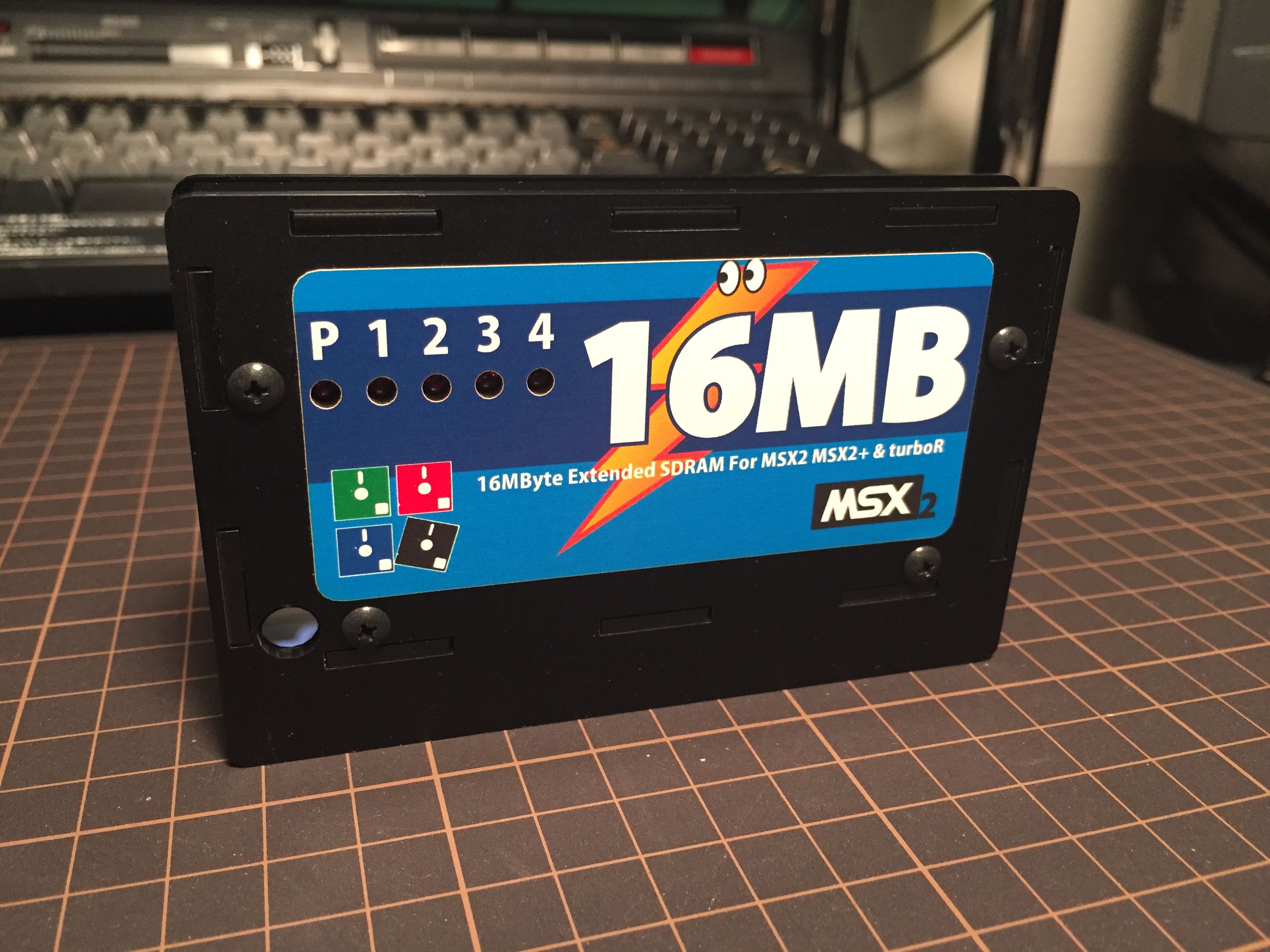
MEMORY SAMURAI / Classic PC & Game Rescue Committee (click to enlarge)
Manufacturer: Classic PC & Game Rescue Committe
The MEMORY SAMURAI arrives in a clear vinyl bag including the cartridge and a paper sheet with instructions. It’s nice enough, though a box would have been much better.
Keep reading below for the full review.
Read more ›Multi-review: MSX Memory Mapper, MEGA-MAPPER and MEMORY SAMURAI (Part 1 of 2)
Posted by Javi Lavandeira in Hardware,MSX,Retro,Reviews,Technology | July 13, 2016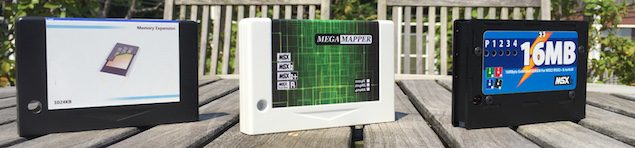
How do you even review a memory expansion cartridge? Usually you just plug it into a cartridge slot, turn on the computer, and that’s all: your MSX computer now has more memory. There isn’t really much else to say, or at least there wasn’t, until now.
In this review we’re going to see two traditional MSX memory expansions (Repro Factory‘s MSX Memory Mapper and 8bits4ever!‘s MEGA-MAPPER), plus a very special new arrival: Classic PC & Game Rescue Committee’s MEMORY SAMURAI, which brings an astonishing 16MB of memory to our MSX computers.
I’ve never seen so much memory in an MSX computer before, much less know what to do with it. It is awesome nonetheless.
Keep reading, because there’s a lot to talk about.
Read more ›Relearning MSX #45: Pointers, arrays and strings (Part 2)
Posted by Javi Lavandeira in Development,How-to,MSX,Retro,Technology | June 20, 2016
In the previous post we learnt what pointers are, their properties, and how to use them. However, most likely this didn’t help understand why pointers are so useful or why we even need them at all. Today we’re going to take care of that.
Pointers are most valuable when combined with other functionalities of the C language. Let’s start by taking a look at how they work with arrays.
Read more ›Relearning MSX #44: Pointers, arrays and strings (Part 1)
Posted by Javi Lavandeira in Development,How-to,MSX,Retro,Technology | May 24, 2016
Pointers are a special type of data in the C programming language (and also C-like languages). In short, a pointer is just a variable that contains the memory address of some data in the computer. It’s a simple concept, but pointers are always a source of confusion when we’re learning the language. However, once understood they become a powerful tool that provide lots and lots of flexibility.
Today we’re starting a short series explaining what pointers are and how they can make our programs much more interesting. As always, don’t hesitate to ask in the comments below when anything isn’t clear.
Let’s begin.
The address operator (&) and the indirection operator (*)
Computers store all program data and variables in an area known as memory. In MSX computers memory is organized in 65,536 cells(*), each containing a number between 0 and 255 (known as a byte).
Each memory cell is identified by a number between 0 and 65,535 (0x0000 – 0xFFFF in hexadecimal). We call this the memory address.
It’s easy to visualize this concept if we think of the computer memory as an spreadsheet with 65,536 rows, such as this one:
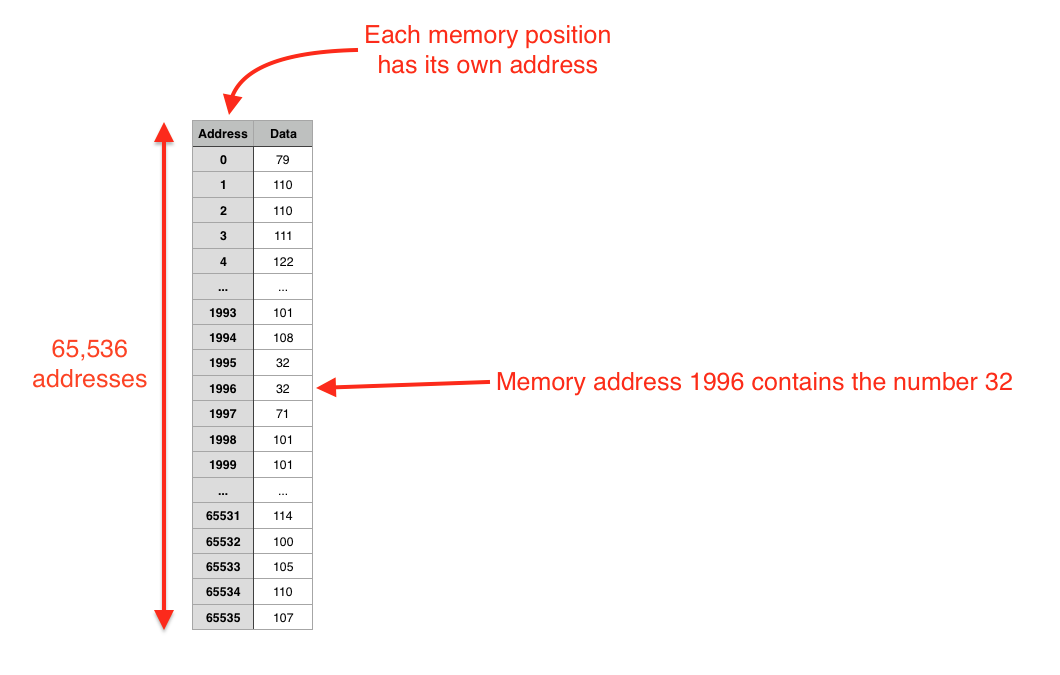
Memory cells and data (Click to enlarge)
Relearning MSX #43: Storage classes and variable scope in MSX-C
Posted by Javi Lavandeira in Development,How-to,MSX,Retro,Technology | May 13, 2016
We’ve already seen how to use local variables inside a function declaration. However, there are times when we want to be able to share the same variable between several functions. In this situation local variables aren’t the best solution.
There are other cases when we want to use a local variable, but we need the variable to retain its value between calls to the function.
In this chapter we’re going to see how to declare and use variables to support these two situations.
The storage class of a variable
All variables in C have a property called storage class. The storage class defines the lifecycle of a variable. This means that depending on this property, a variable can either be created and destroyed several times during the execution of a program (whenever we call the function or block that defines the variable), or created once and exist until the program finishes.
Variables in MSX-C can belong to one of the two storage classes below:
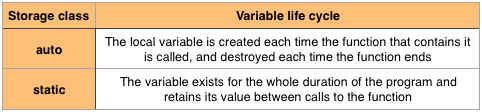
Storage classes in MSX-C
Relearning MSX #42: Functions in MSX-C (Part 3)
Posted by Javi Lavandeira in How-to,MSX,Retro,Technology | April 12, 2016
The previous post dealt with function arguments and private variables inside functions. Today we’re going to complete our study of functions by looking at how we can return values from them.
Let’s jump into it.
Read more ›Relearning MSX #41: Functions in MSX-C (Part 2)
Posted by Javi Lavandeira in How-to,MSX,Retro,Technology | March 4, 2016
It’s been a bit over two months since the previous post. In it we learnt how to define simple functions that don’t take or return any parameters. We also learnt that we need to declare a function if we’re calling it at a point in our program where it hasn’t been defined yet.
Today we’re resuming the course exactly where we left it. If you need a refresher then go ahead and re-read the previous chapter. As always, don’t hesitate to ask questions in the comments below if anything isn’t clear.
Let’s see a few more properties of functions in C:
Read more ›Relearning MSX #40: Functions in MSX-C (Part 1)
Posted by Javi Lavandeira in How-to,MSX,Retro,Technology | December 21, 2015
We’ve covered a lot of ground already, but so far we haven’t seen anything about MSX-C that couldn’t be done with some effort with MSX-BASIC. That changes with the posts that follow.
Today we’re going to see one of the strengths of the C programming language: functions.
Let’s get to it.
Defining and using functions
When we write a program, as the source code becomes bigger and bigger it becomes much more complex and more difficult to maintain. Because of this, no matter what programming language we use, we normally divide a big program into smaller parts that perform a specific action. For example, in BASIC we used to write subroutines and call them with GOSUB.
In C we do this with functions.
Defining a function
Before we can use a function we have to indicate what code it is going to execute and what name we’re going to give to it. We call this the function definition.
The way we define a function changes slightly depending on whether it takes parameters or not, and whether it returns any data or not. Let’s start with the simplest cases and then look at more complex scenarios.
Function without parameters nor return value
The simplest case is a function that doesn’t take any parameters and that performs some action, but doesn’t return any data. It’s basically just a bunch of C statements grouped together and given a name. This is how we define such a function:
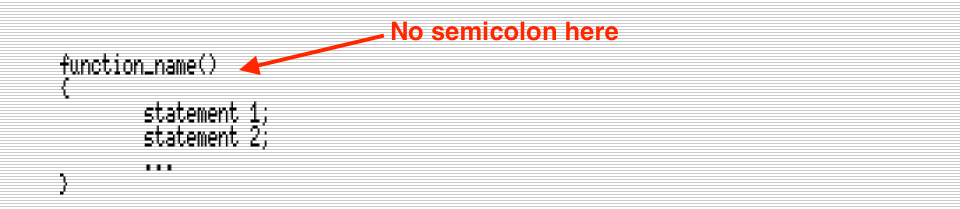
(Click to enlarge)
Relearning MSX #39: Graphic characters and additional quoted symbols
Posted by Javi Lavandeira in How-to,MSX,Retro,Technology | December 16, 2015
In the last few posts we’ve learnt how to control what’s being printed on the screen. Soon we’ll move on to something else (functions!), but first we’re going to see how to handle graphical characters and how to print any character inside a double-quoted string.
The MSX graphic characters
MSX computers have a set of 32 special characters known as graphic characters. These only occupy one position on the screen and one byte in the video RAM, but in order to display them we have to print a 2-byte sequence.
We can type all of these characters by pressing the GRAPH key together with normal alphanumeric characters on the keyboard, but not all the characters generated with GRAPH are 2-byte codes: some are normal characters from the ASCII table (we’ll see these in the future).
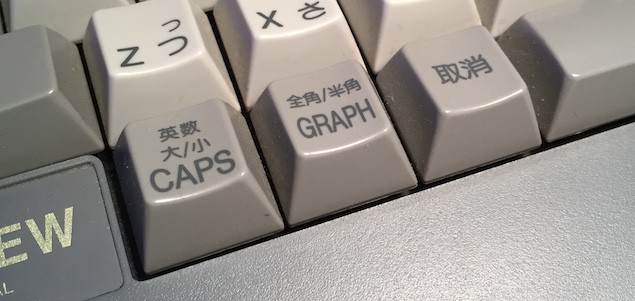
The GRAPH key on a Japanese MSX computer
Also, it’s important to remember that most of these graphic characters will be different from one MSX to another depending on the country of origin of the computer. For example, a Japanese MSX computer would display several commonly used kanji characters, while an European MSX would display several other useful symbols:
Read more ›Relearning MSX #38: Screen escape sequences
Posted by Javi Lavandeira in How-to,MSX,Retro,Technology | December 11, 2015
In the last post we learned about control characters and the C escape sequences that represent some of them. Today we’re going to see a different kind of escape sequences: the ones that control the console.
You may remember that among the list of control characters we saw there were two that weren’t used to control the screen, but instead mark the beginning of either a graphic character or a terminal escape sequence. In this chapter we’re going to see how to use one of these (character code 27, or \33, or 0x1B):
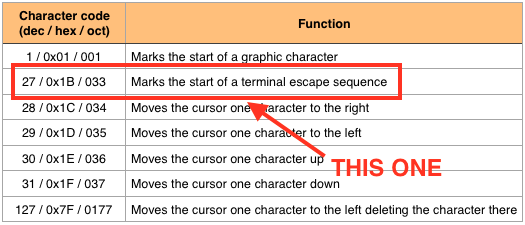
Printing this character by itself does nothing. However, when it is followed by certain sequences of characters we can control several aspects of the text screen such as the position and shape of the cursor.
Read more ›